
Calendar
The weekly grid shows only genuinely free slots. The system will not let one slot be taken by two clients — the final check happens inside a database transaction.
Product · Booking system Available
The client picks the service, the specialist and the time themselves — at eleven at night too. You see a full schedule in the morning.
From €20 / mo. · setup 100 € one-off · no contract term
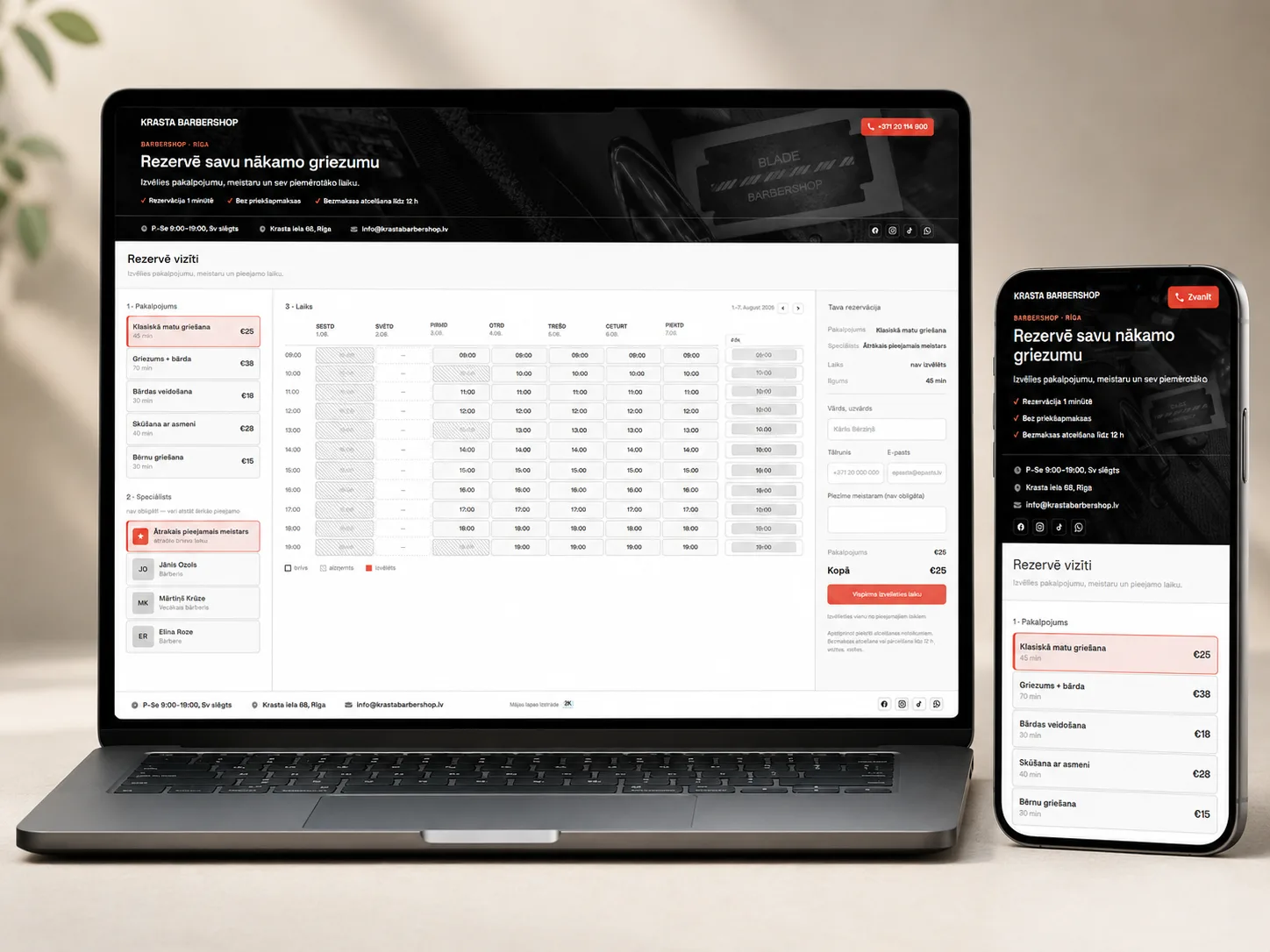
The weekly grid shows only genuinely free slots. The system will not let one slot be taken by two clients — the final check happens inside a database transaction.
Each specialist has their own working hours, lunch break, days off and holidays. The client can also skip choosing — the system finds the nearest free slot.
A public page with your texts, images, prices and team. You choose the colours, the font and the button style, and the page can run on your own domain.
The client books in the evening or at the weekend, gets a confirmation code and can cancel or move the appointment themselves up to a set time before the visit.
Three packages by team size, and the number of bookings is unlimited in every one of them. On top of the monthly fee there is a one-off setup fee of 100 €, covering installation, data entry and training. I am not registered for VAT, so no VAT is added to the invoice.
No registration, no account and no phone call. The client picks the service, the specialist and the time, enters their contacts and gets a confirmation with a code.

A paper notebook, Instagram messages, WhatsApp and two phones — and at some point two clients turn up for the same slot. A booking system collects every appointment in one calendar, works out the free slots from the service duration and the specialist's schedule, and refuses to hand one slot to two people. The client books themselves — at night too, and while your hands are busy.
ProblemOne slot goes to two clients: one booked by phone, the other by Instagram message, and both entries reached the notebook a minute apart.
SolutionBefore saving, the slot is checked again inside a database transaction with a row lock. If two people press the button at the same moment, only the first succeeds — the second sees immediately that the slot has just been taken.
ProblemSome in the notebook, some in a phone, some in a Messenger thread. Nobody knows exactly what tomorrow looks like.
SolutionOne calendar for everything. Client bookings arrive automatically, and the ones who call or walk in you enter in the admin panel — they take the slot online straight away.
ProblemColouring takes two hours, a trim 30 minutes, but both are booked as an hour. The day is already running late by morning.
SolutionEach service has its own duration and price. Free slots are calculated from the chosen service: a time is only offered if the service fits fully before the end of the day.
ProblemA client books colouring with someone who does not do it, and the appointment has to be moved on the spot.
SolutionFor each service you mark which specialists do it. The client only sees those, and free slots are calculated from their schedules. Mark nobody and everyone does it.
ProblemThe client wants to book in the evening or at the weekend, but nobody answers. By the next morning they have booked somewhere else.
SolutionThe booking page works around the clock. People can book while you are working, asleep or on holiday.
ProblemSomeone books a day when the salon is closed or the specialist is away.
SolutionBlocks close off a specific time or several days — for the whole business or for one specialist. Those times disappear from availability immediately.
ProblemIt is in the schedule but not in the bookings — and lunch goes uneaten again.
SolutionWorking hours are entered in pieces: 09:00–13:00 and 14:00–19:00. The break is simply not part of the working day, so nothing can be booked into it.
ProblemSomeone books a slot ten minutes from now while you are already on the road; someone else books for March next year.
SolutionYou set how many hours of notice a booking needs and how far ahead the calendar is open at all. Everything else is simply not shown to the client.
ProblemThe client forgets to cancel, or cancels an hour before, and there is no time left to fill the slot.
SolutionThe client cancels themselves with the booking code up to a set number of hours before the visit, and the slot returns to the calendar immediately. Automatic reminders before the visit cut down forgotten appointments.
ProblemThe request was sent, there is no answer, and an hour later comes the call: "did you book me in?"
SolutionRight after booking the client sees a confirmation with the code, the time, the specialist and the price. The same code lets them find and cancel the booking later.
ProblemThe price of a service changes, and old bookings suddenly show the new amount.
SolutionThe price is frozen at the moment of booking. A later price change does not affect appointments already made.
ProblemIn the morning it is not clear how many bookings there are today and how many are still waiting for confirmation.
SolutionThe admin home page shows today's overview with the number of bookings and their statuses. Wider statistics are on the roadmap.
A page with your texts, images, prices and team. Choose a single page with booking right on it, or a website with a separate booking page.
On a computer, a weekly table of free slots; on a phone, a swipeable day strip and only that day's times.
Name, description, duration in minutes and price. The duration decides which slots are offered to the client at all.
Working hours for the business as a whole or for each specialist separately, lunch breaks, days off and holidays.
A Filament panel where you manage services, specialists, schedules, bookings and page content. You only see your own data.
Colours, font, corner rounding and button style are chosen in the admin panel and reach the page immediately. Nobody touches the code.
The client gets a booking code they can use later to find and cancel their visit up to the set deadline.
If booking needs to be embedded in an existing website or app, the services, free slots and bookings are available through the API too.
A website is rarely the only thing that needs sorting. So along with the project I set up everything around it — the profiles, the content and the documents. All of it is already in the price, and there is no separate invoice for it.
Everything listed above is included in the price. There is no separate charge for creating profiles, tidying up the copy or the document templates. The legal texts are templates you can hand to your lawyer for approval — they are prepared to the requirements of the relevant country, but they do not replace legal advice.
Bookings are unlimited in every package. What differs is the number of specialists and resources, the reminder types, payment and reports.
For a single specialist who finally wants to be rid of the notebook.
20 €/ mo
+ 100 € setup (one-off) · maintenance and hosting included
For a team with several specialists that also needs a proper website.
35 €/ mo
+ 100 € setup (one-off) · maintenance and hosting included
For a larger team, several locations and a link to an existing website.
50 €/ mo
+ 100 € setup (one-off) · maintenance and hosting included
| Feature | Bronze · 20 € | Silver · 35 € | Gold · 50 € |
|---|---|---|---|
| Specialists | 1 | Up to 5 | Unlimited |
| Bookings | Unlimited | Unlimited | Unlimited |
| Email reminders | Unlimited | Unlimited | Unlimited |
| SMS reminders | — | — | 100 per month |
| Own domain | — | Yes | Yes |
| Design customisation | Basic colours | Full | Full |
| Page layout | One page | One or two pages | Several locations |
| REST API | — | — | Yes |
| Support | By email | Email and phone | Priority |
| Maintenance and hosting | Included | Included | Included |
| Setup | 100 € one-off | 100 € one-off | 100 € one-off |
Prices are per company per month. On top of every package there is a one-off setup fee of 100 € — it covers installing the system, entering the services, specialists and working hours, setting up the page content and design, and training. The system keeps being developed, and new features are added to the packages without a price change as soon as they are ready. I am not registered for VAT, so no VAT is added to the invoice.
I reply within a few hours with concrete next steps. The request creates no obligation and asks for no payment details.
We go through the services, durations, specialists, working hours and the rules of how bookings happen today.
I enter the services, prices, specialists and schedules, set up the page content and design, and connect the domain.
We run through several scenarios — a simultaneous booking, a cancellation, a day off — and tune the time step and the rules.
The system goes live and I stay available for questions and adjustments according to the chosen package.
If something is missing from the packages — unusual rules, an integration with an existing system or an entirely different process — the same thing can be built individually as a separate project.
Get a website, online store or web system built for you, with a clear budget, a transparent process and support after launch.
projects delivered
client rating