Product · A ready-made online store with a CRM Available

Start selling online without a big upfront investment

A ready-made online store with an admin panel, a CRM and a customer portal in one system. No paying several thousand for development from scratch — start with a clear monthly fee and a one-off setup.

  • Continuous improvements and new capabilities
  • Regular security updates
  • Fast setup and rollout — the product is already ready to use
  • Retail
  • Cosmetics and food
  • B2B wholesale
  • Manufacturers
  • Subscription products

From €99 / mo. · setup €490 one-off · no fixed term
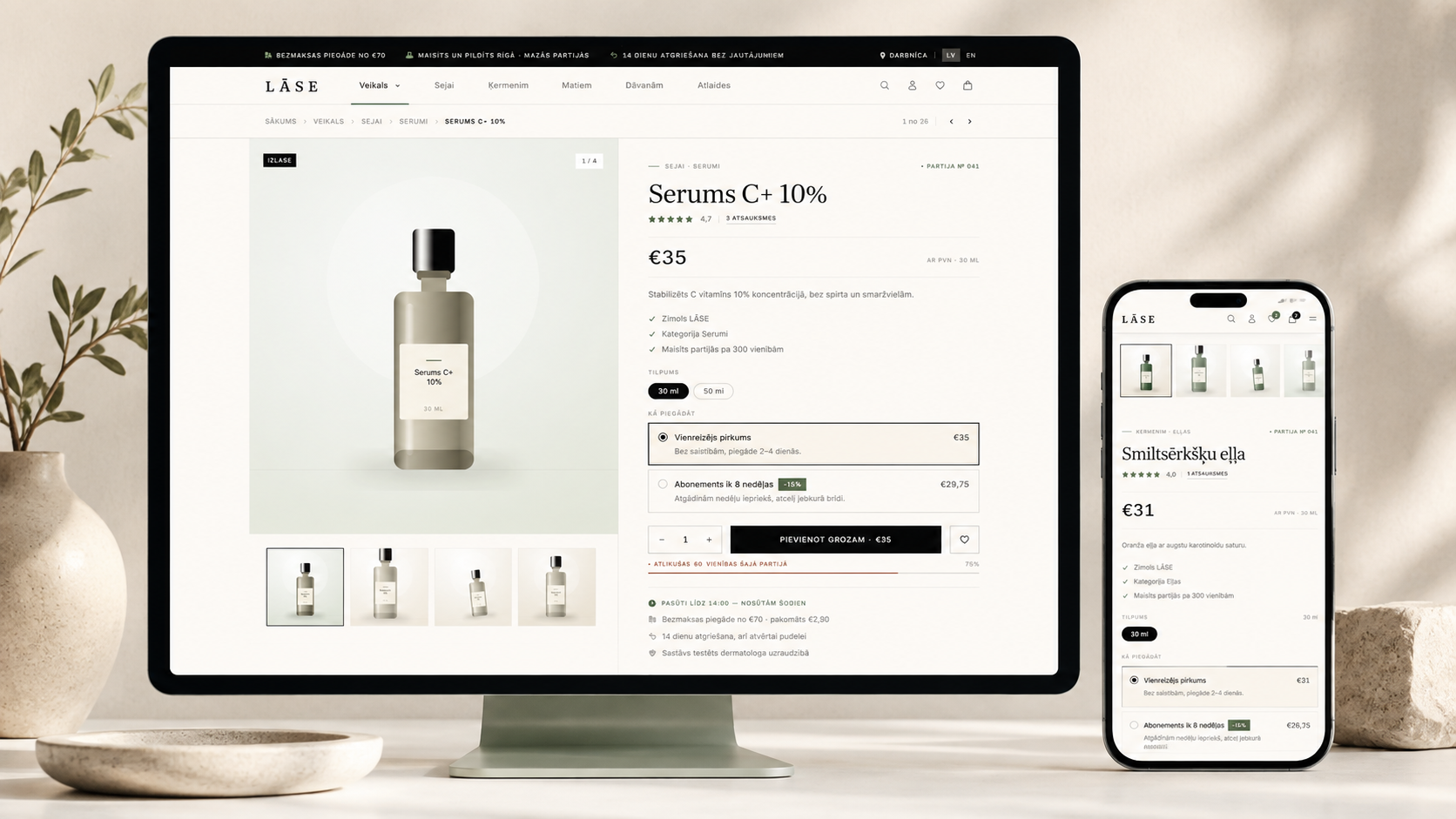
The online store on a computer and a phone: a product page with a gallery, a size choice, a one-off purchase or a subscription, and adding to the cart

Store and admin panel

The public side and the admin panel are one system. An order appears in the panel immediately — with separate order, payment, fulfilment and invoice statuses.

B2C and B2B in one store

A consumer sees the retail price; a company sees its own price list or individual price, its credit limit and its payment terms. One company can have several users with different permissions.

Stock that does not oversell

Stock is reserved inside a database transaction with a row lock. Every change has its own movement with the quantity before and after, so stock can always be traced back to a reason.

CRM and customer portal

Leads, a deal pipeline, tasks and support tickets. In their portal the client sees their orders, invoices and deliveries — and only their own.

Price

A simple price with no hidden costs

Three plans based on how far you need to go: from a store for consumers to B2B price lists, purchasing and multiple warehouses. The number of products and orders is unlimited in all of them. On top of the monthly fee there is a one-off setup fee of 490 €, covering installation, data entry and training. I am not registered for VAT, so no VAT is added to the invoice.

From 99 € / per month Bronze · Silver · Gold New features and platform improvements are included in the subscription.
What it looks like

The store, the account and the admin panel

Screenshots from a working system with demo data. The public side is adaptable to your brand; the admin panel and the portal look the same in every store.
Store

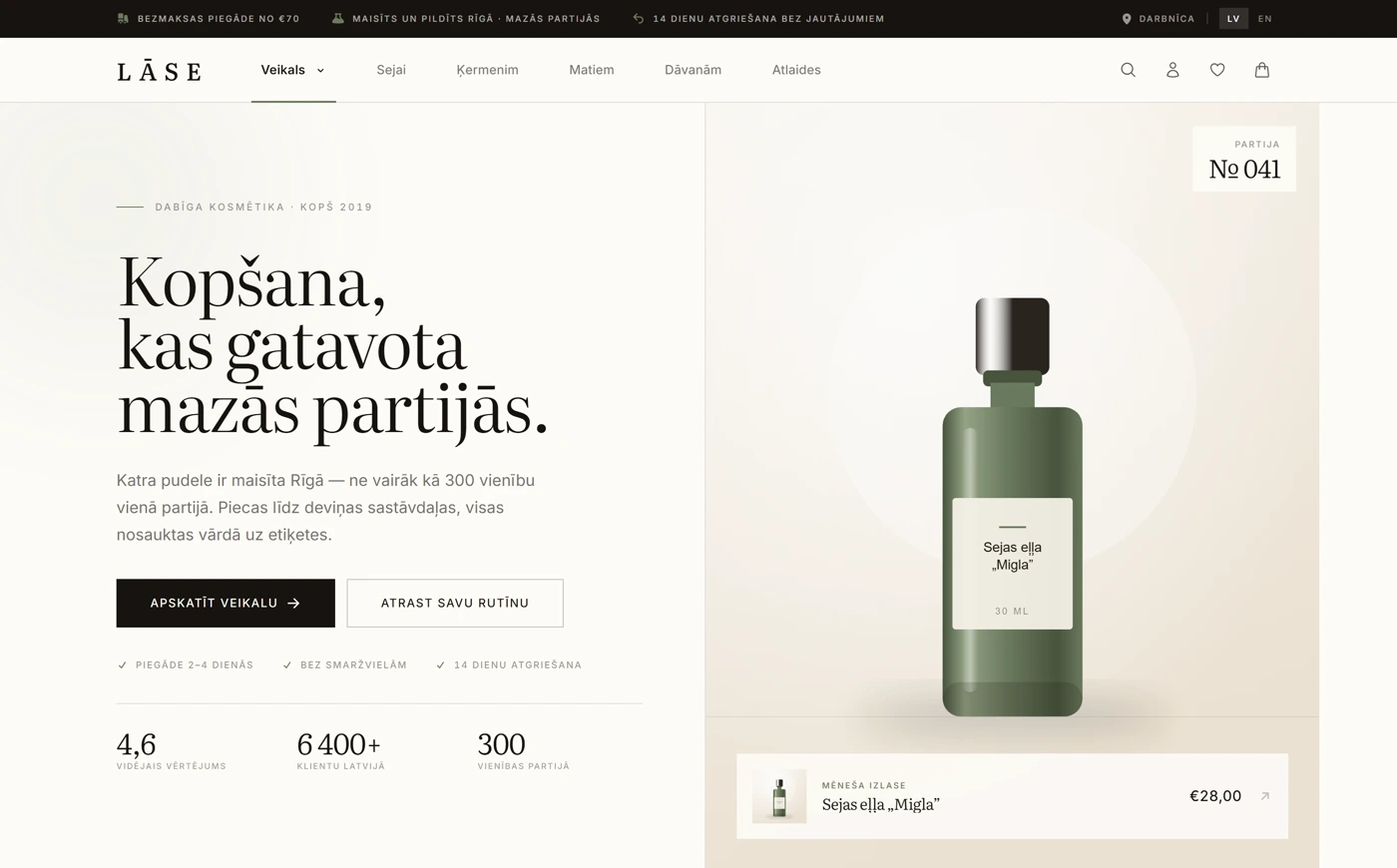
Home page — Announcement bar, navigation with a mega menu, a hero with a featured product and store statistics.
Home page Announcement bar, navigation with a mega menu, a hero with a featured product and store statistics.
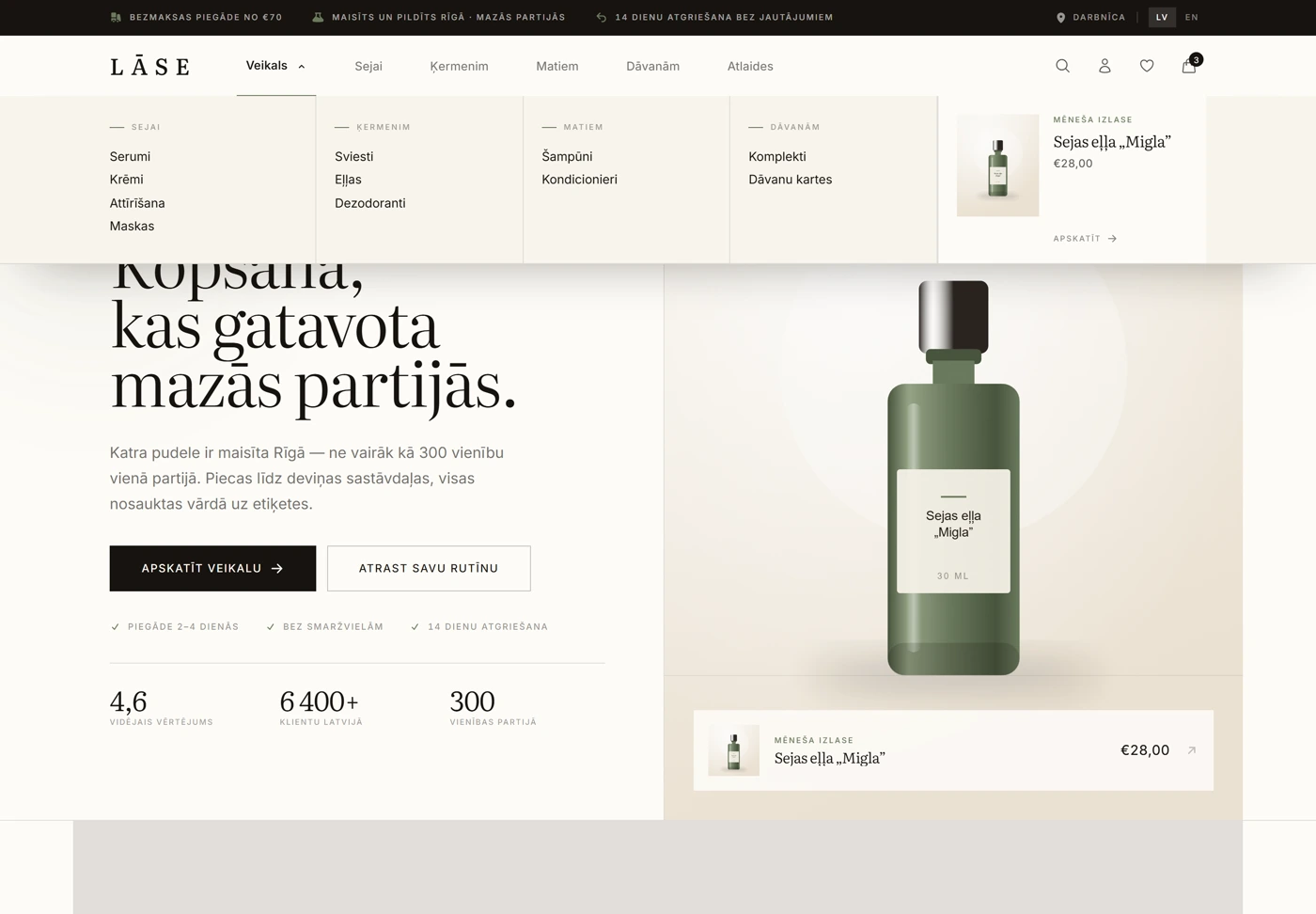
Mega menu — The category tree opens in one view together with the highlighted products.
Mega menu The category tree opens in one view together with the highlighted products.
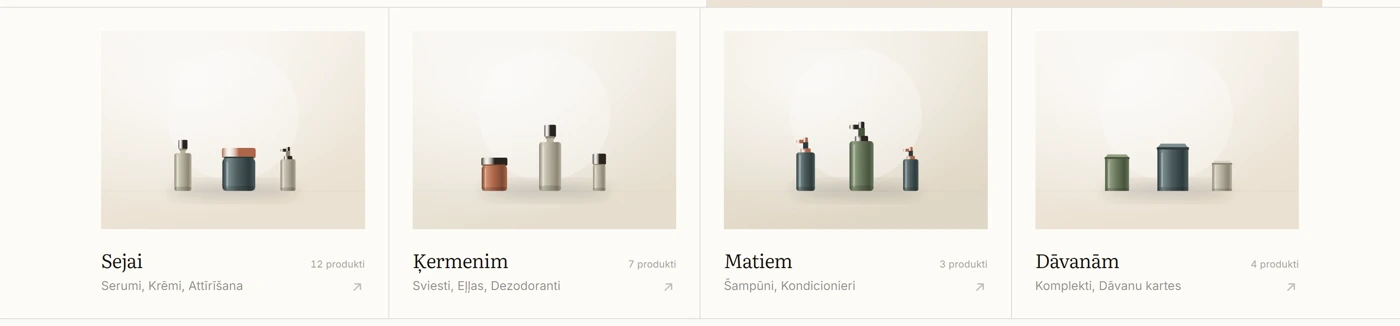
Category bar — Root categories with product counts and images.
Category bar Root categories with product counts and images.
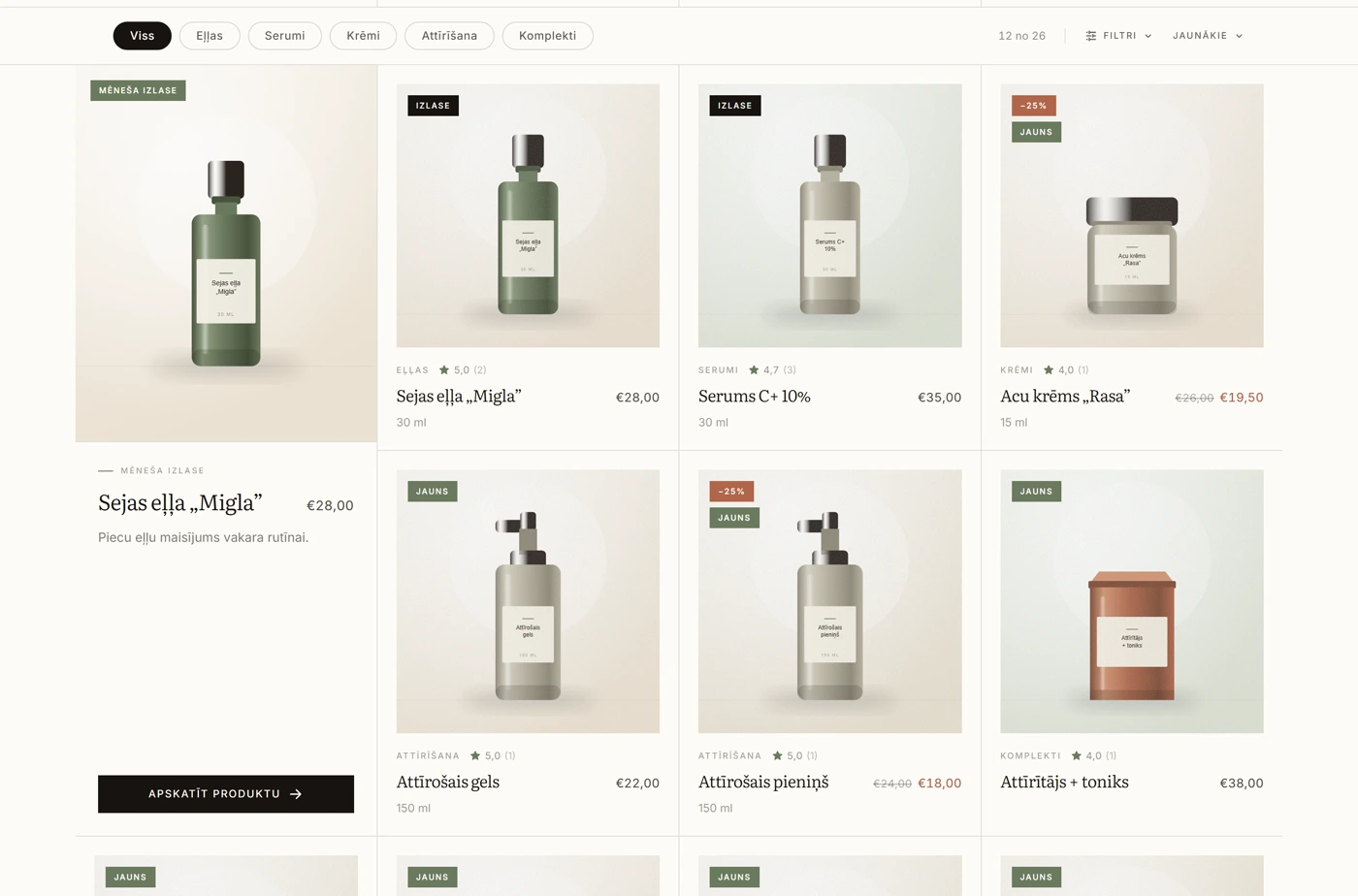
Catalogue — A grid with category chips, sorting, the monthly selection, and discount and “New” badges.
Catalogue A grid with category chips, sorting, the monthly selection, and discount and “New” badges.
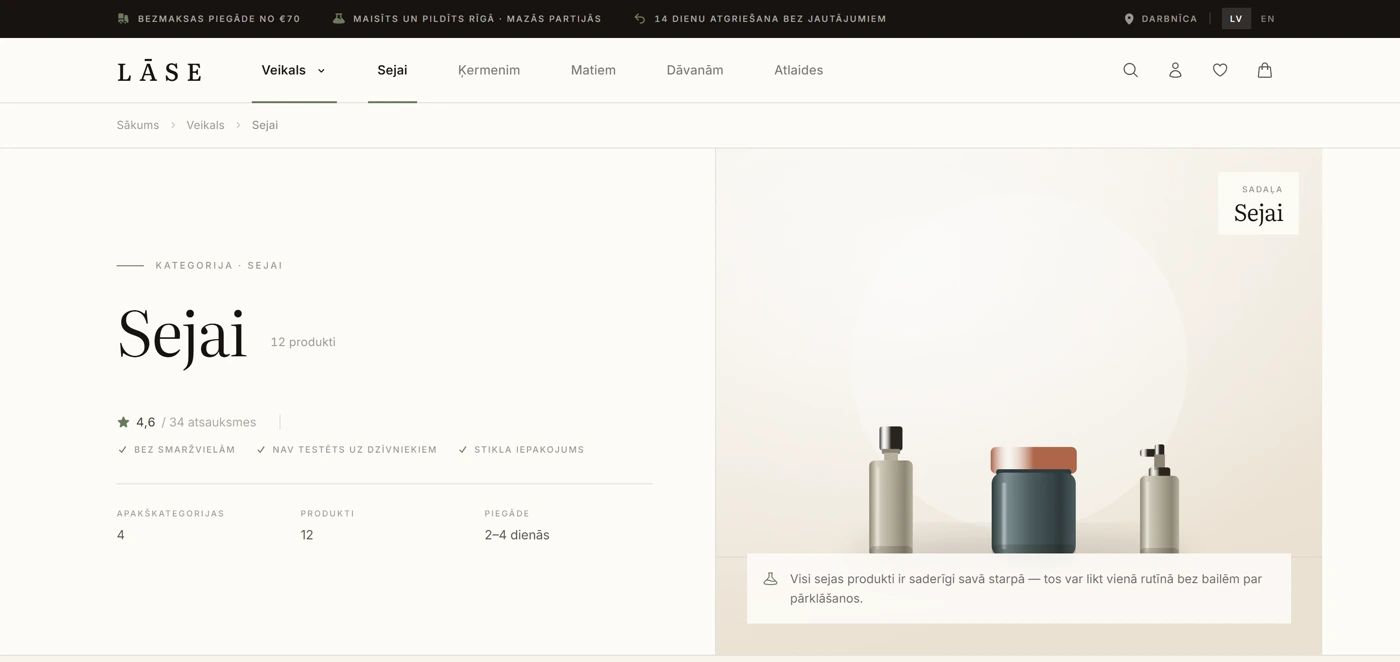
Category page — The category hero with the rating, the number of subcategories and the delivery time.
Category page The category hero with the rating, the number of subcategories and the delivery time.
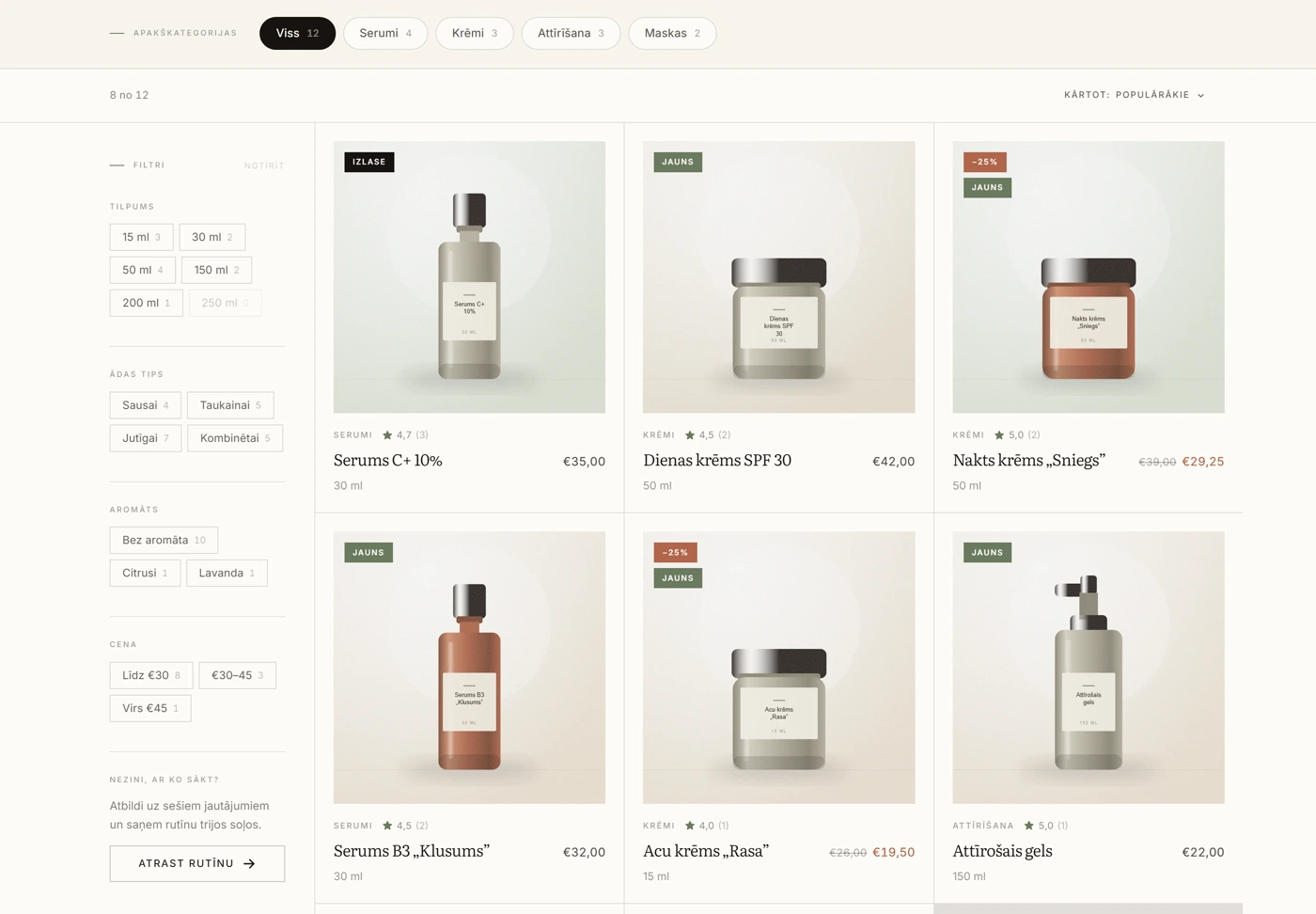
Filters — Sidebar filters with live counters — every tick immediately shows how many products will remain.
Filters Sidebar filters with live counters — every tick immediately shows how many products will remain.
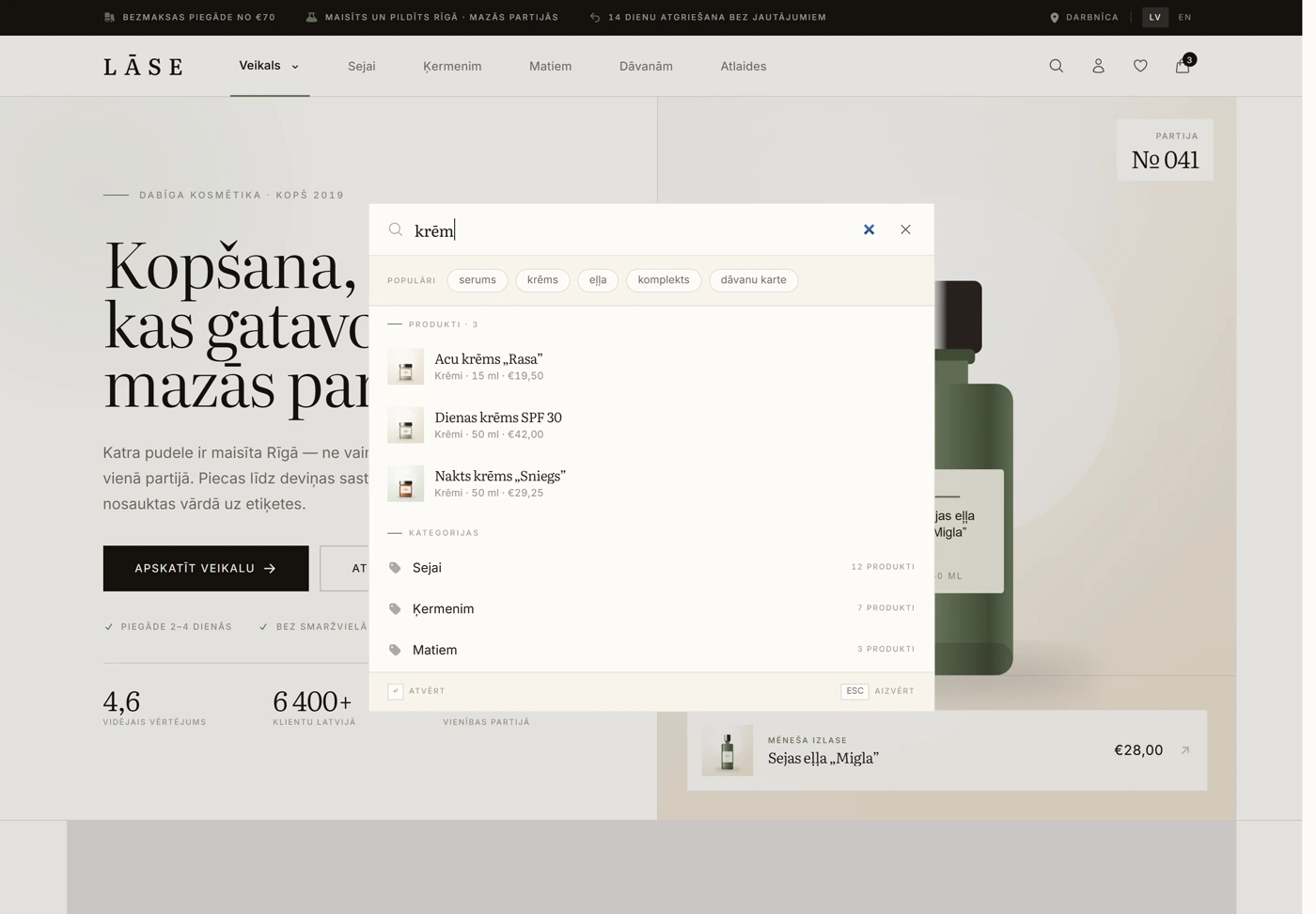
Search — Search shows products with prices and categories with product counts while you are still typing.
Search Search shows products with prices and categories with product counts while you are still typing.
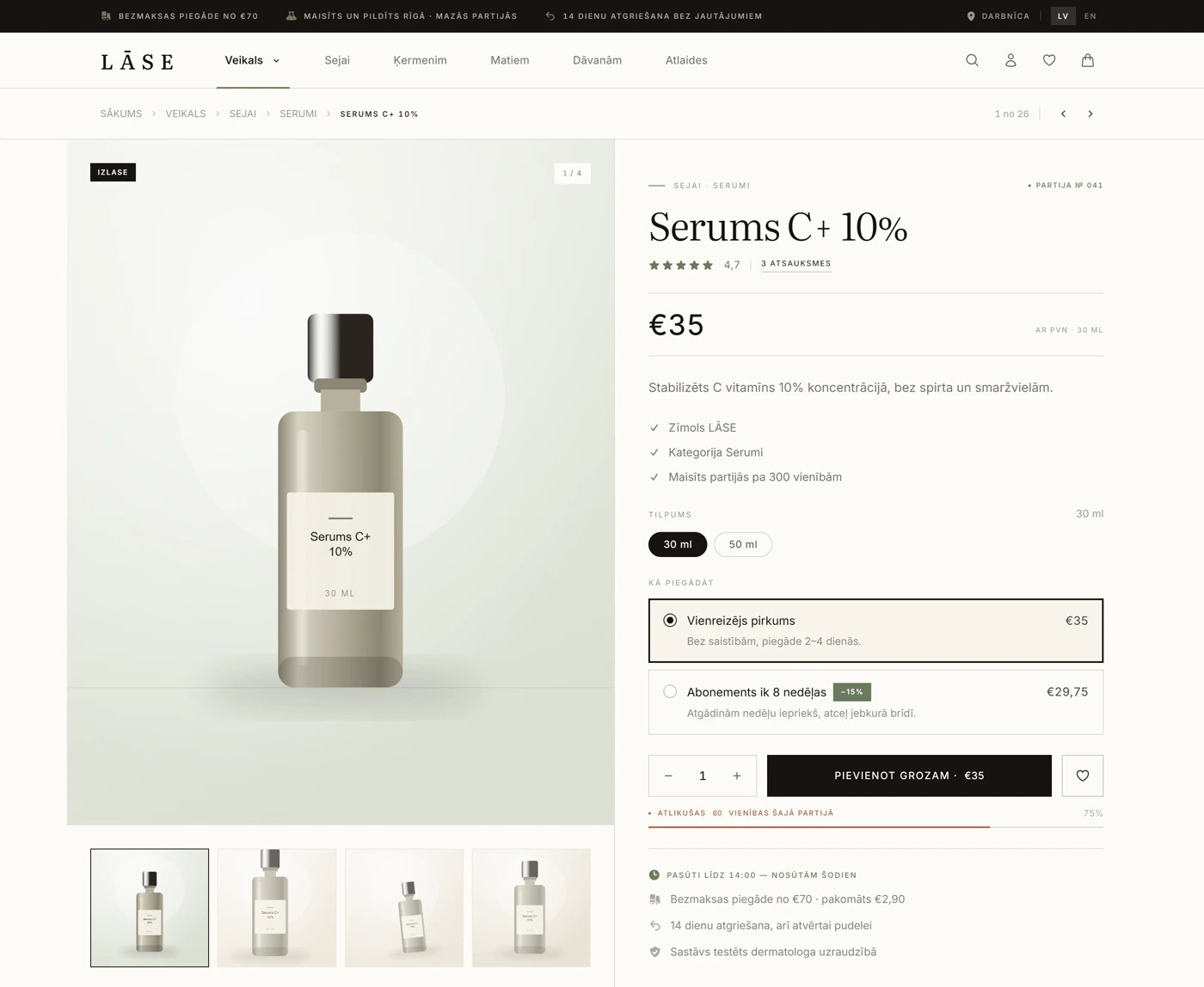
Product page — A gallery with thumbnails, variant selection, one-off purchase versus subscription, and a stock bar.
Product page A gallery with thumbnails, variant selection, one-off purchase versus subscription, and a stock bar.
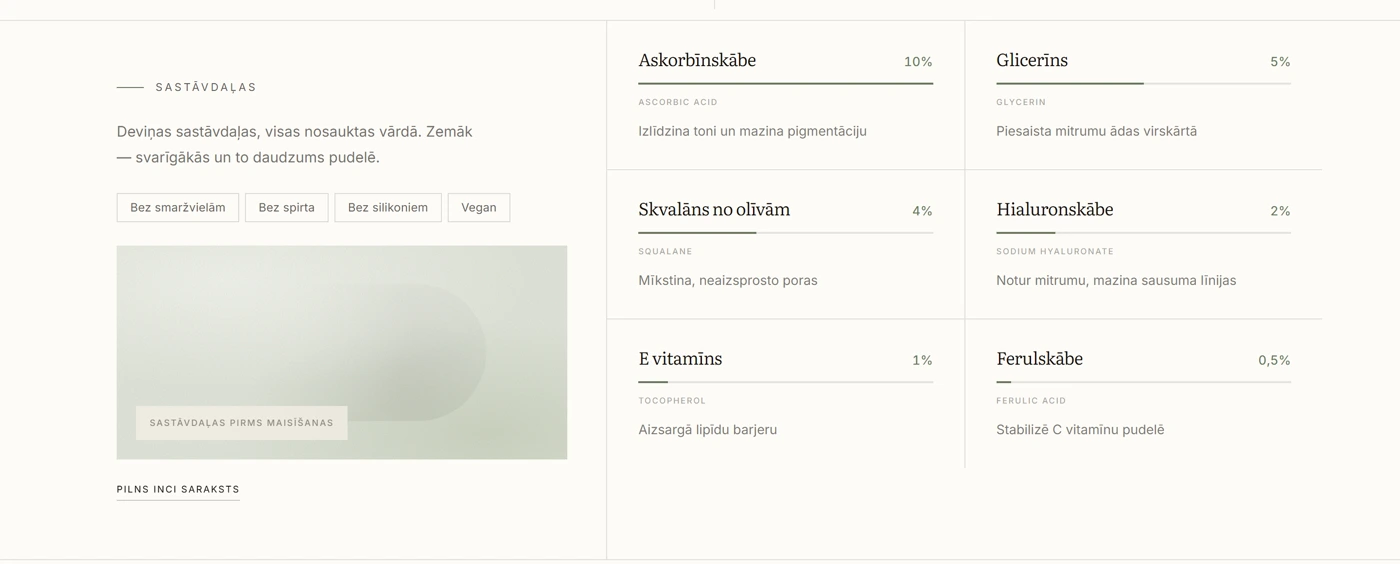
Ingredients — An ingredient list with percentages and names — a freely composed product tab.
Ingredients An ingredient list with percentages and names — a freely composed product tab.
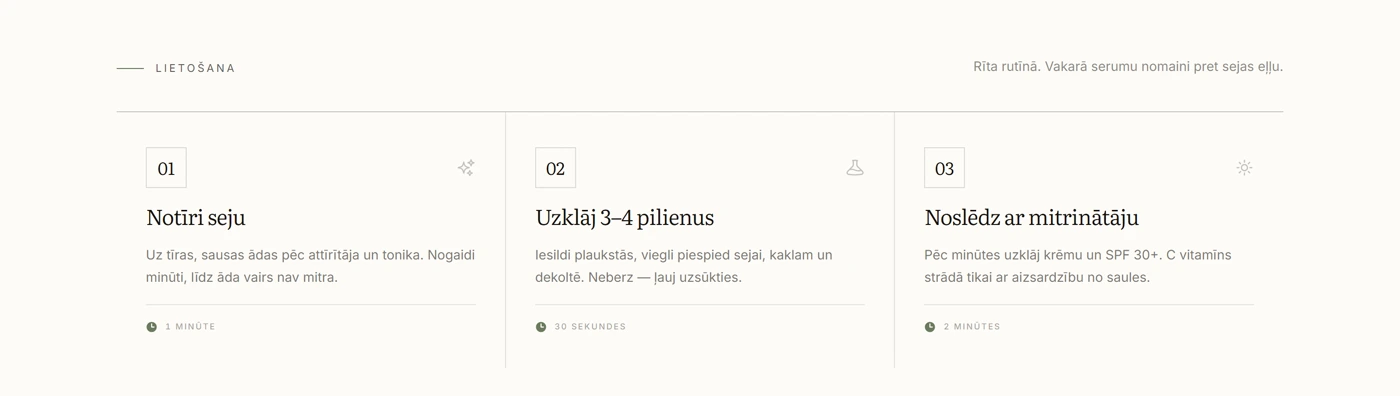
How to use — A three-step instruction with timings.
How to use A three-step instruction with timings.
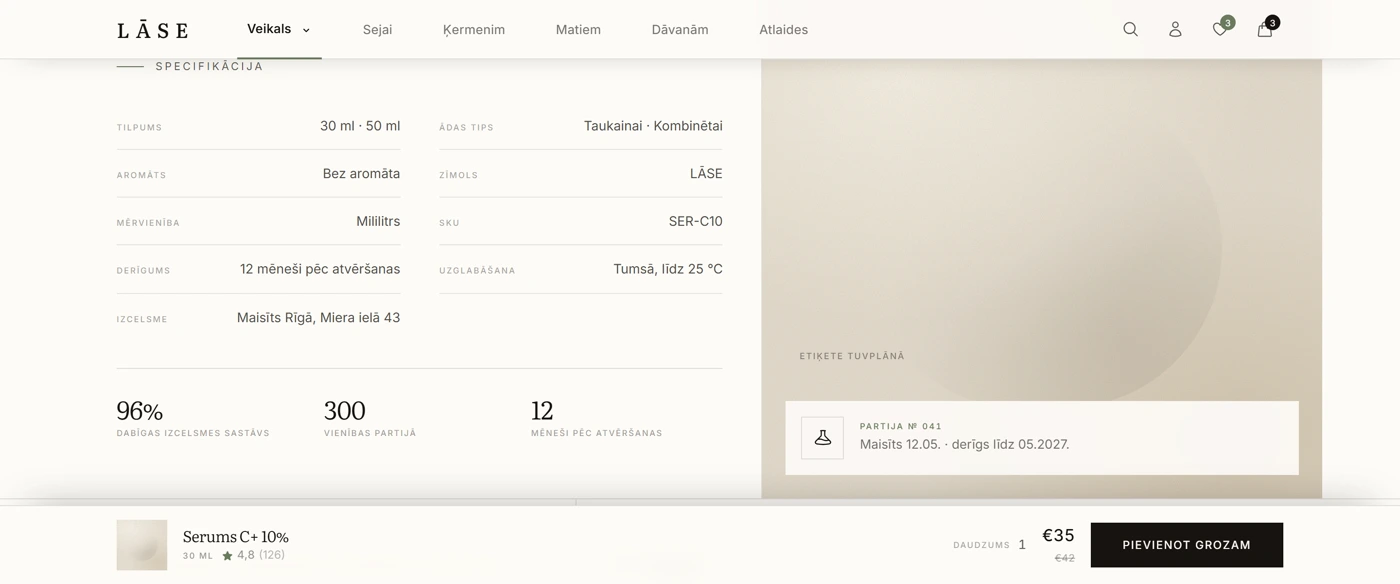
Specification — A specification table and batch data.
Specification A specification table and batch data.
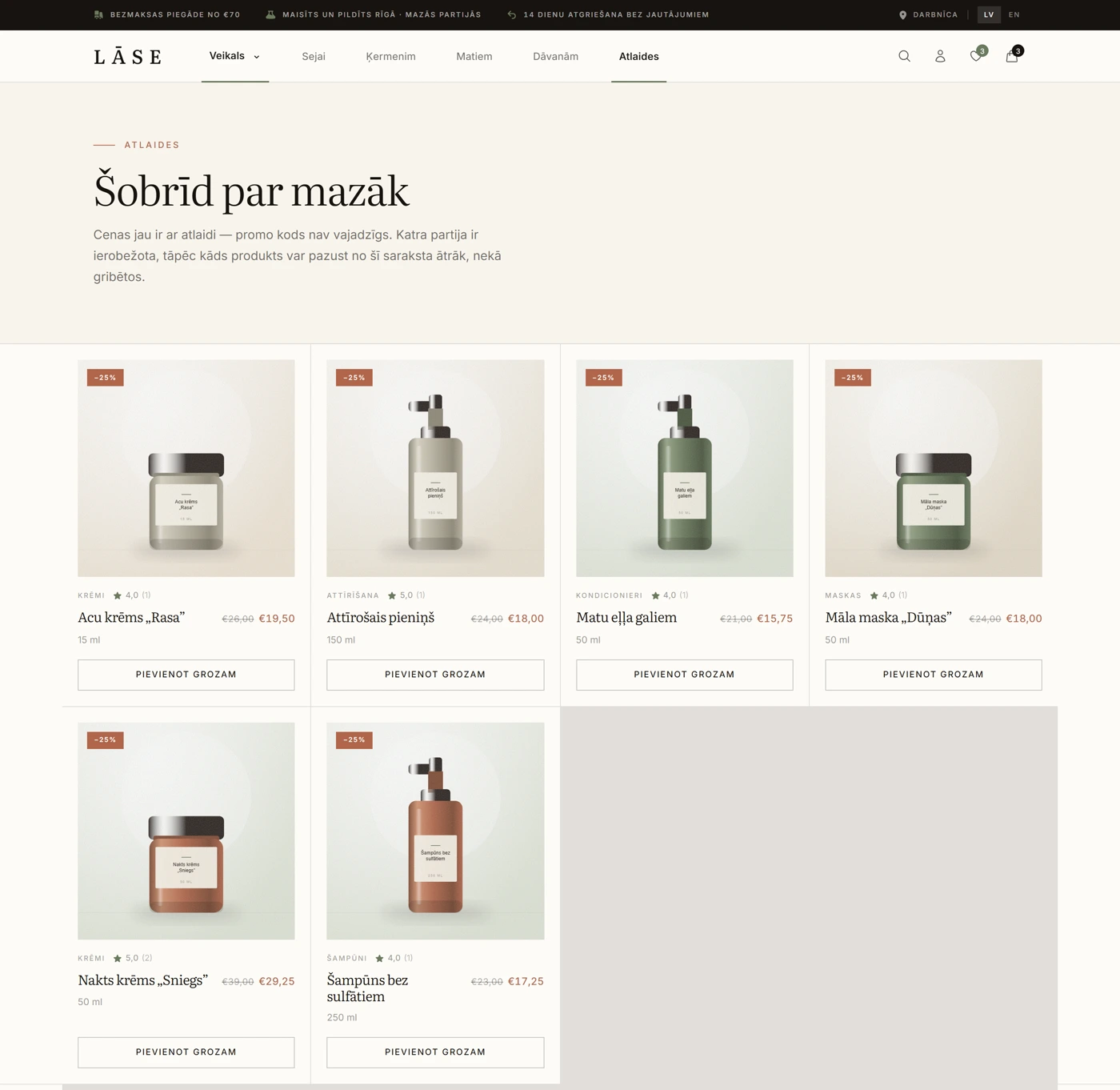
Discounts — A promotions section with percentage badges and struck-through original prices.
Discounts A promotions section with percentage badges and struck-through original prices.

Cart and purchase

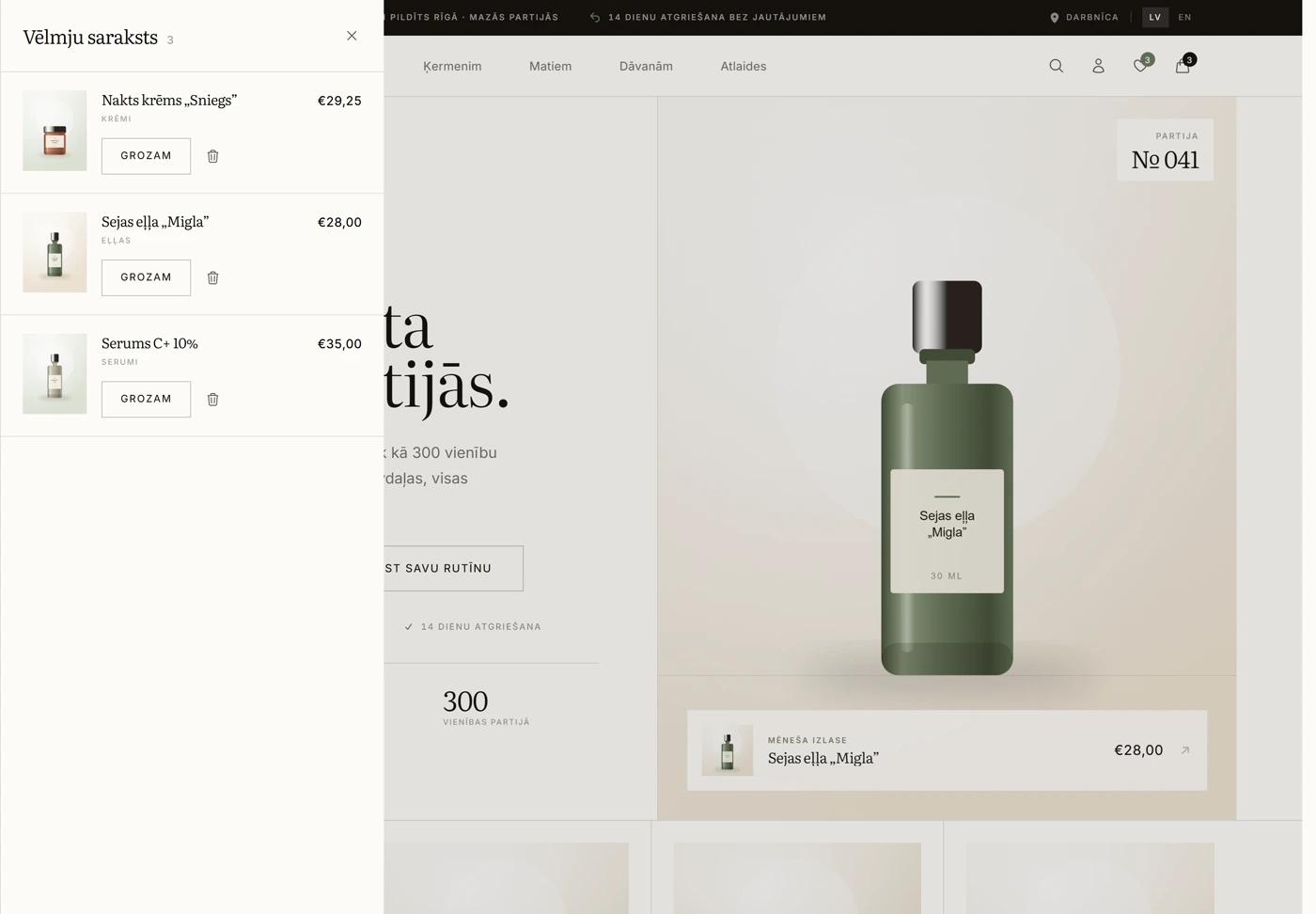
Wishlist — Saved products open in a side panel; from there they can be added to the cart or removed.
Wishlist Saved products open in a side panel; from there they can be added to the cart or removed.
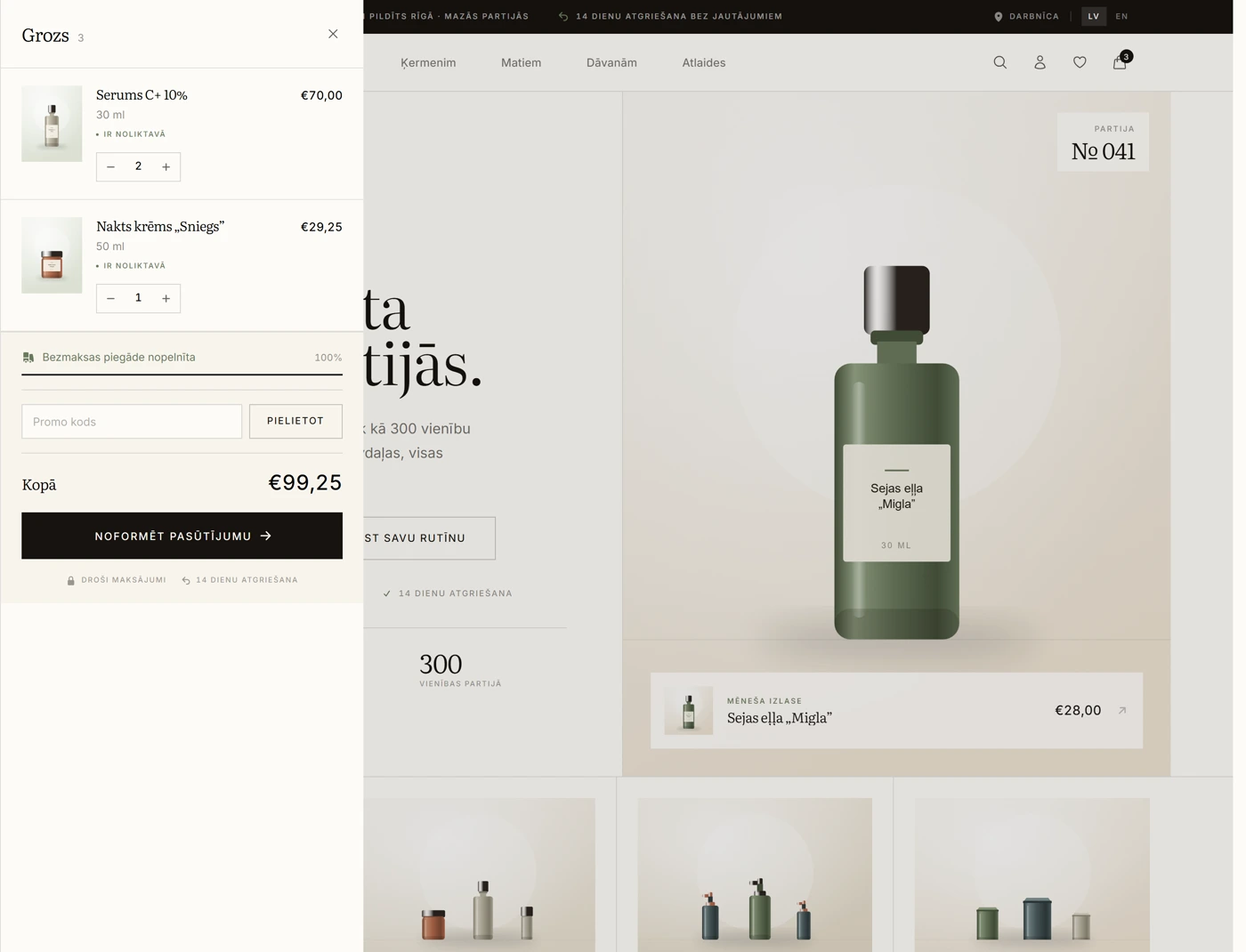
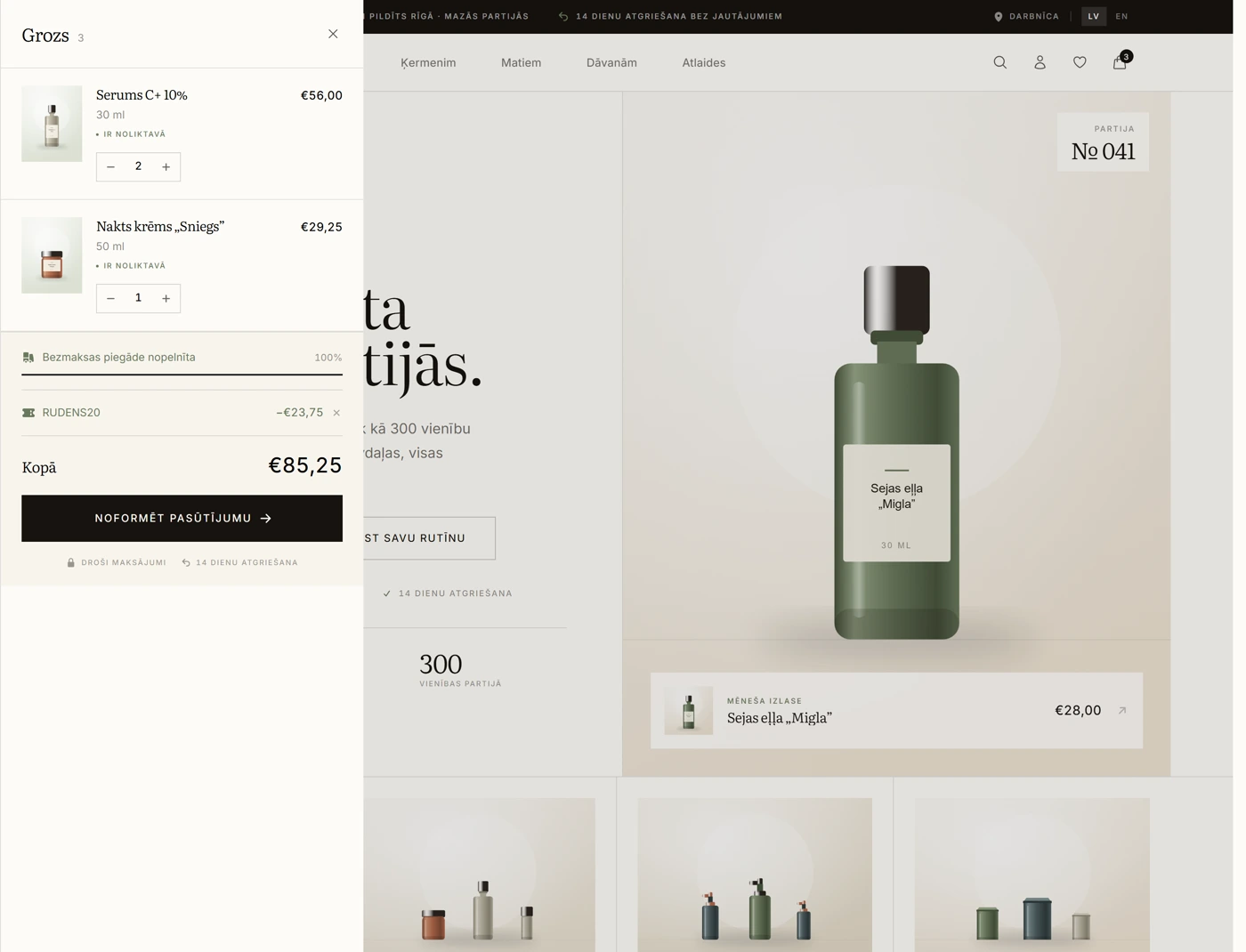
Cart — Quantities, a stock indicator, free-delivery progress and a promo code field.
Cart Quantities, a stock indicator, free-delivery progress and a promo code field.
Promo code — An applied coupon with the discount line and a recalculated total.
Promo code An applied coupon with the discount line and a recalculated total.
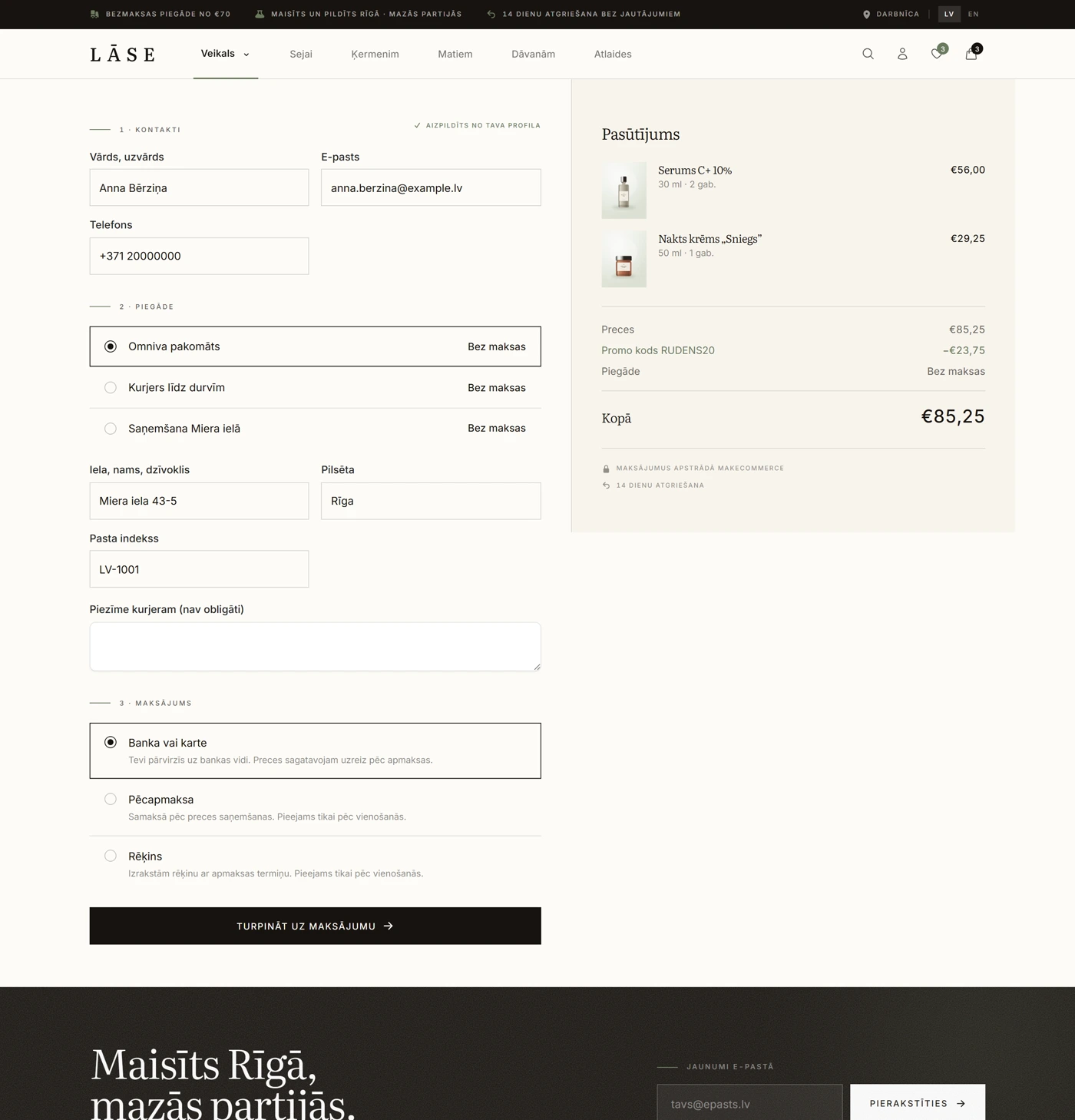
Checkout — Contacts, delivery methods with prices, the payment method and the order summary on one page.
Checkout Contacts, delivery methods with prices, the payment method and the order summary on one page.

Customer account

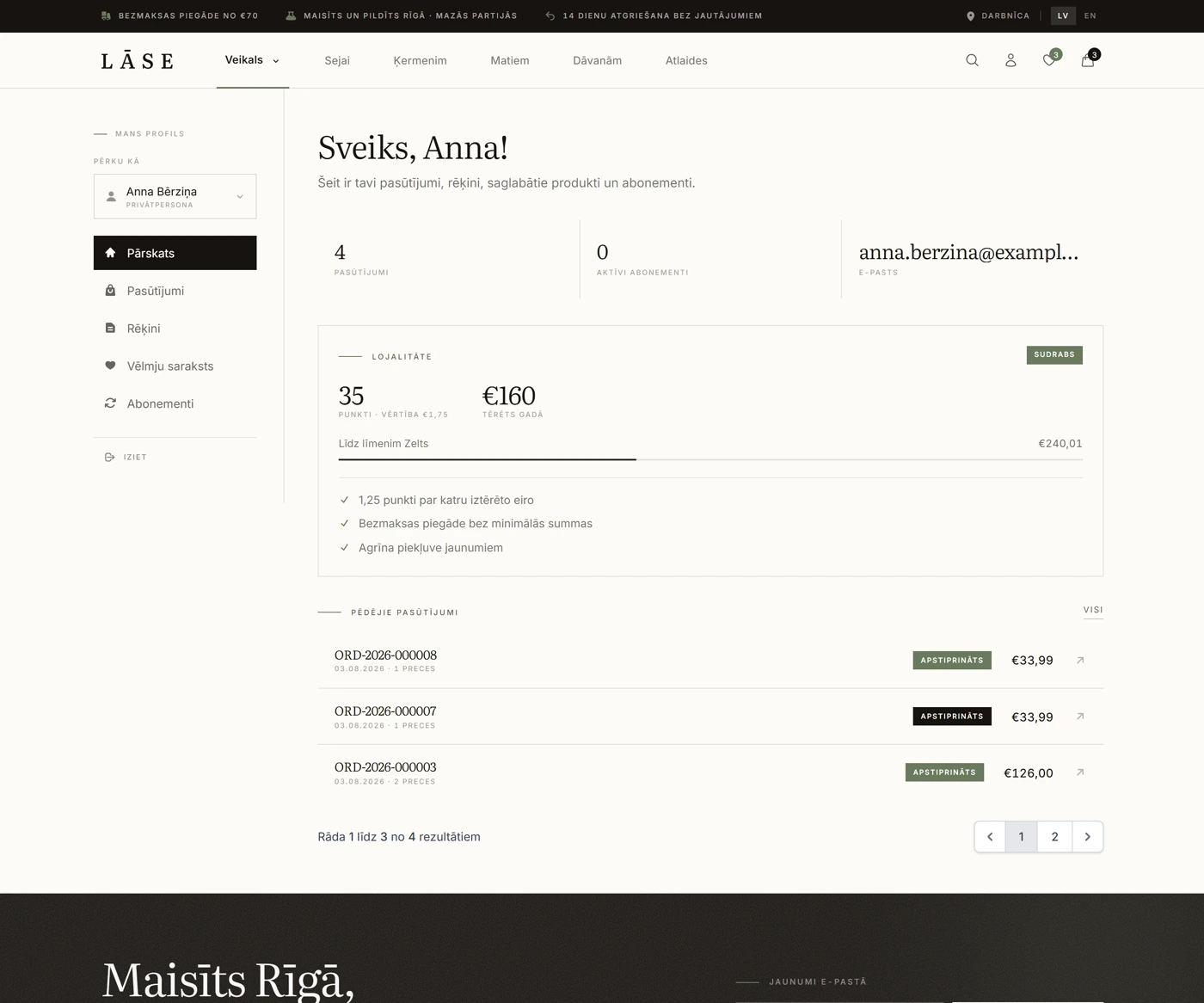
Account overview — The number of orders, the loyalty tier and points, and the latest orders with statuses and totals.
Account overview The number of orders, the loyalty tier and points, and the latest orders with statuses and totals.
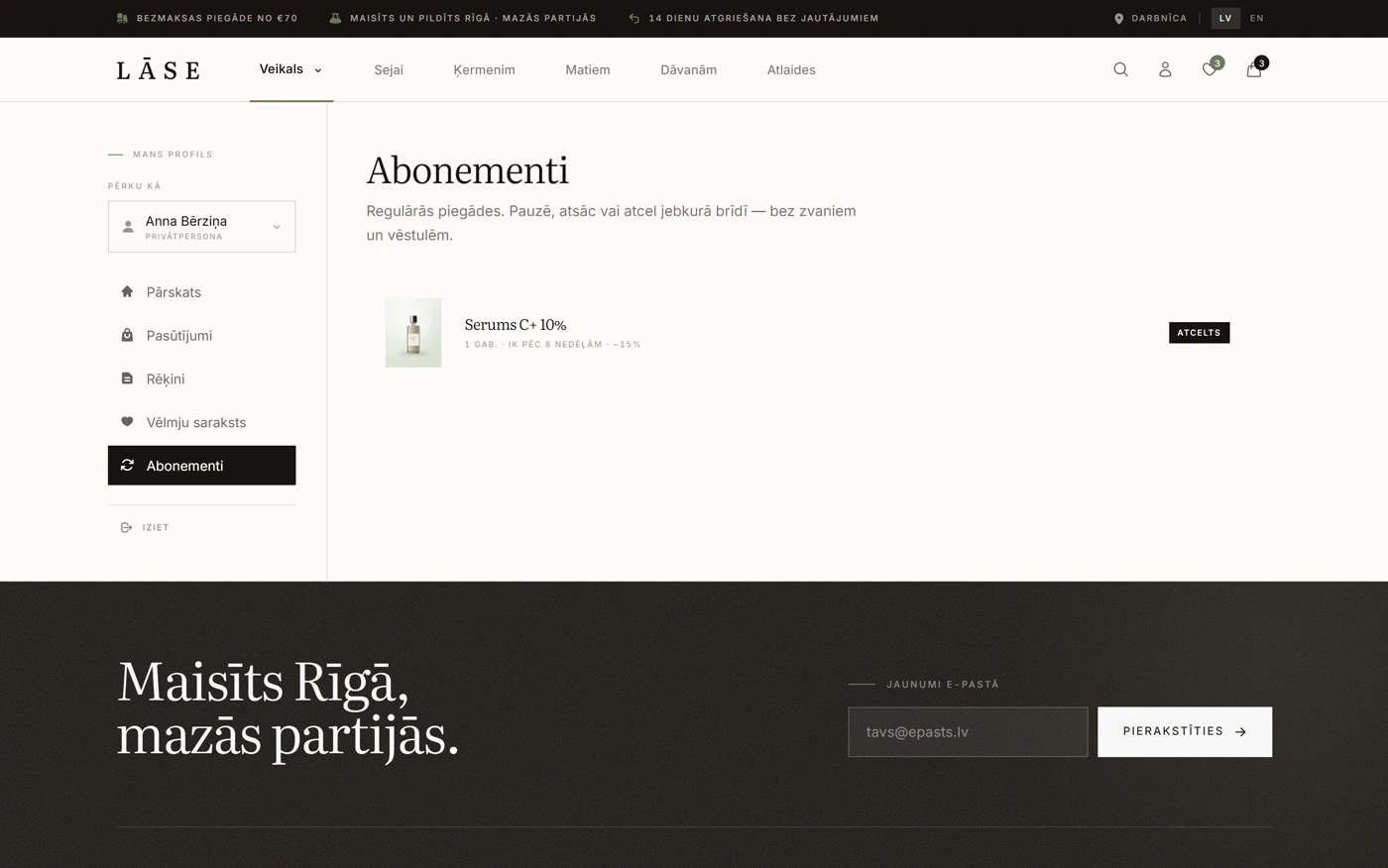
Subscriptions — Recurring deliveries with an interval and a discount — pause, resume or cancel without a phone call.
Subscriptions Recurring deliveries with an interval and a discount — pause, resume or cancel without a phone call.

Admin panel

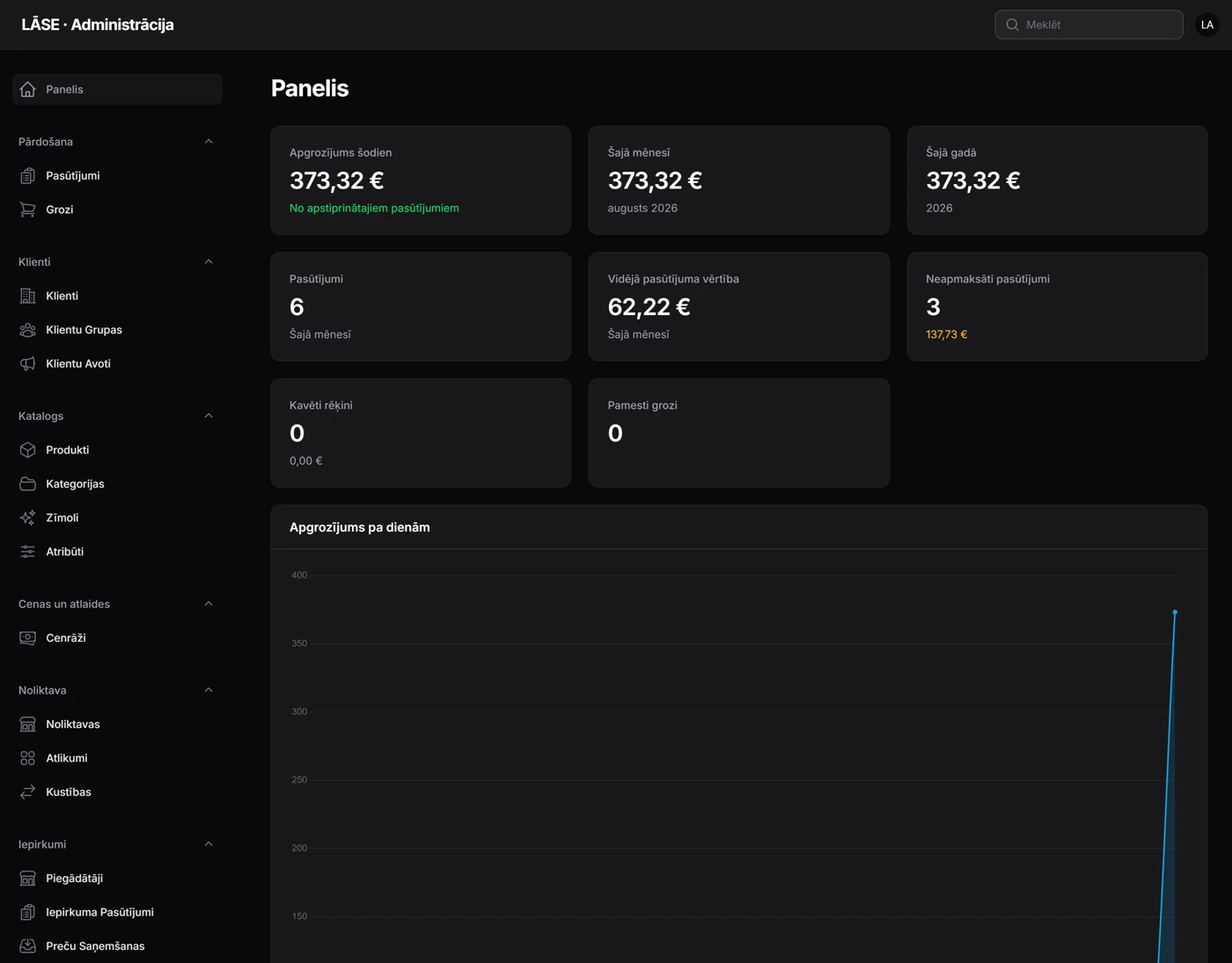
Dashboard — Turnover today, this month and this year, the average order value, unpaid orders and overdue invoices.
Dashboard Turnover today, this month and this year, the average order value, unpaid orders and overdue invoices.
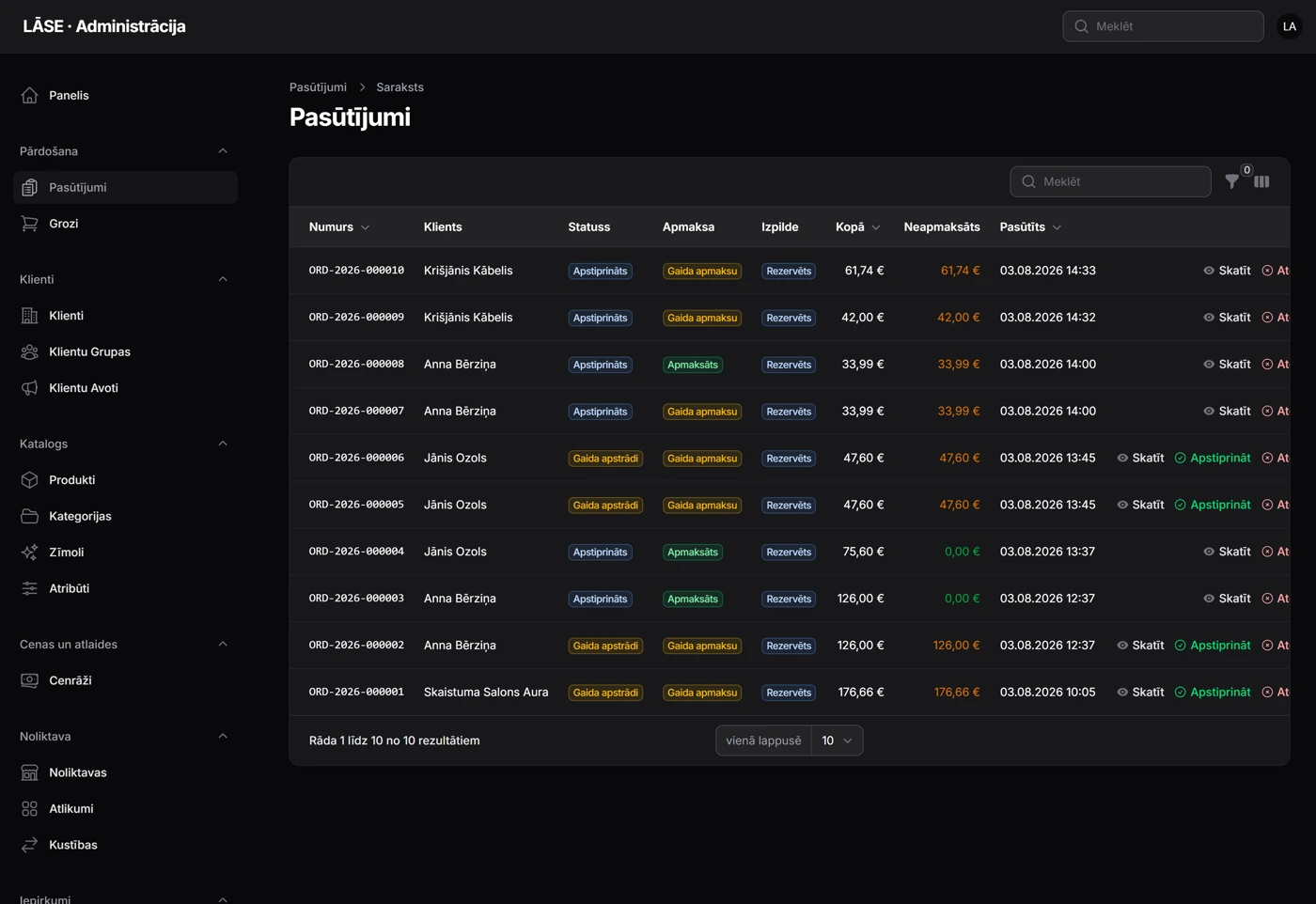
Orders — The number, the client and three separate statuses — processing, payment and fulfilment — in one list.
Orders The number, the client and three separate statuses — processing, payment and fulfilment — in one list.
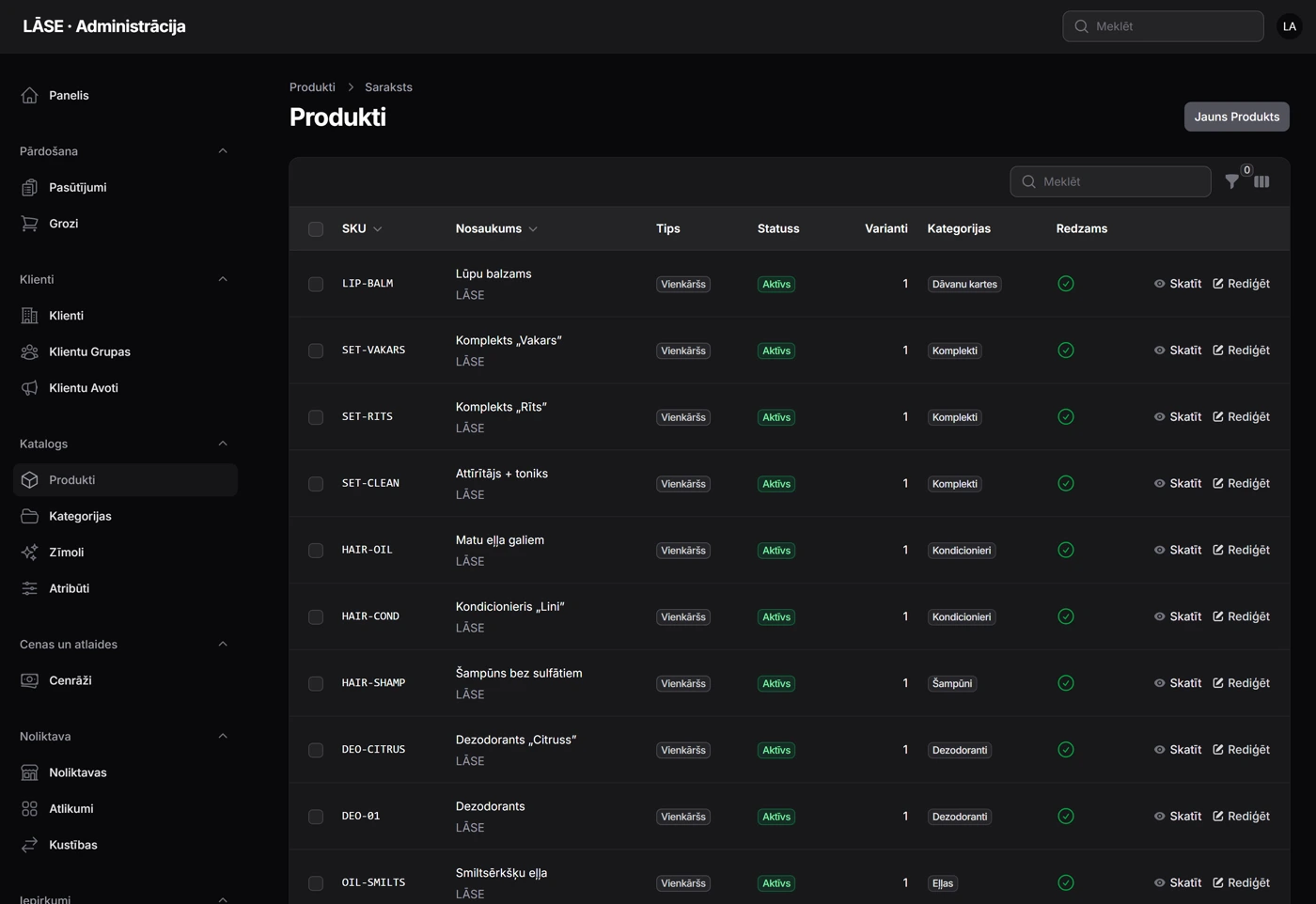
Products — SKU, type, status, the number of variants and categories, editable in place.
Products SKU, type, status, the number of variants and categories, editable in place.
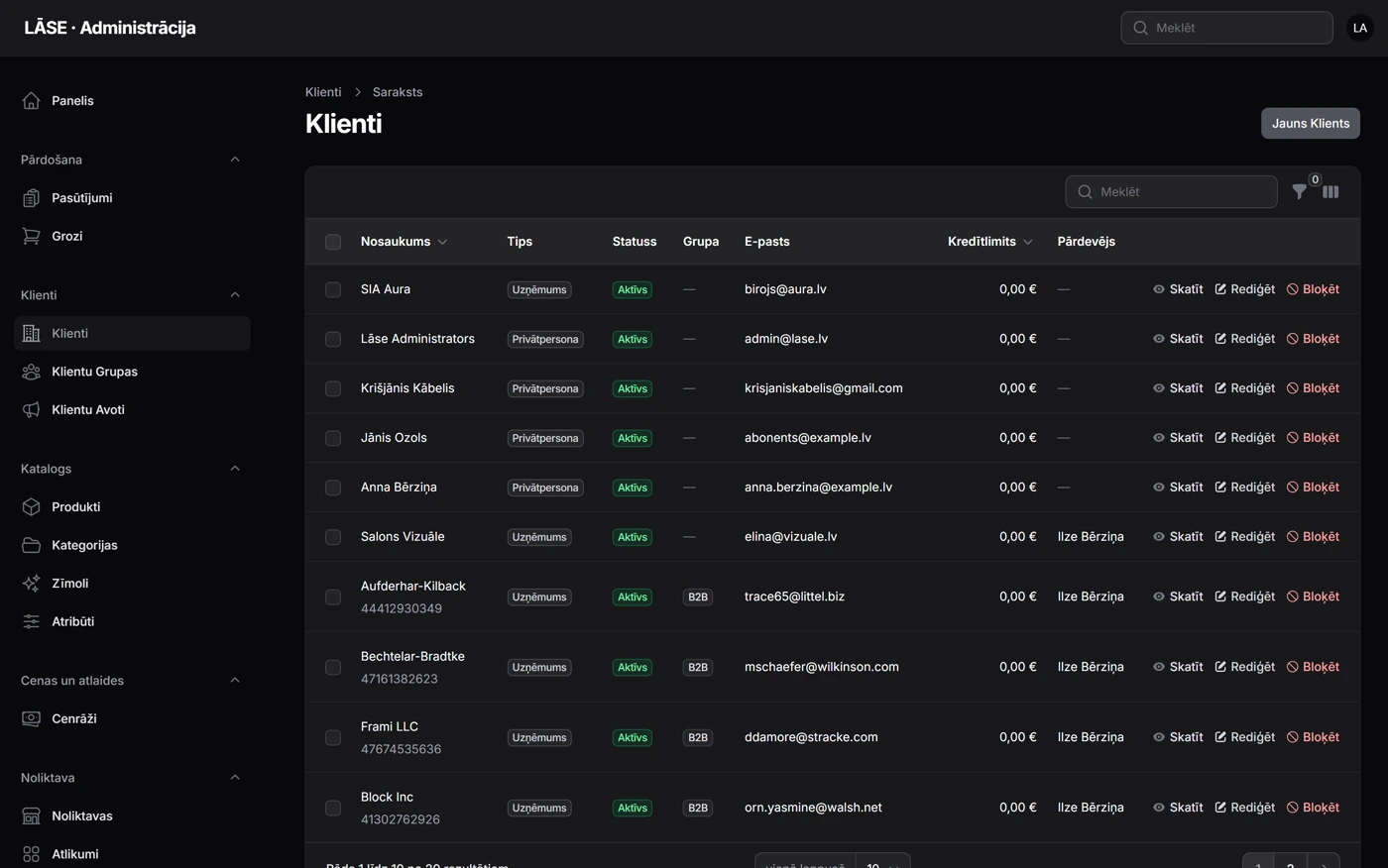
Clients — Consumers and companies in one list with the group, the credit limit and the account manager.
Clients Consumers and companies in one list with the group, the credit limit and the account manager.

The images use the demo brand “LĀSE”. In your store the content, colours, fonts and logo change — not the system itself.

What is included

What you get in every package

Public store

Home page, category and product pages, filters with live counters, search, a wishlist and a cart — on your domain and in your brand colours.

Products with variants

Sizes, volumes and colours as variants with their own SKU, barcode, weight, price and stock. Attributes become filters in the catalogue.

Cart and checkout

Price, discount and VAT are recalculated server-side before the order is created. Availability, stock and the client’s credit limit are checked too.

Orders with history

Separate order, payment, fulfilment and invoice statuses, an immutable line-item snapshot and the full status history with the user.

Stock with reservations

Stock levels, reservations and movements with the quantity before and after. One item cannot be sold to two clients, and every change has a reason.

Invoices and payments

Invoices with their own numbering, partial payments, splitting one payment across several invoices, credit notes and a refund ceiling against what was actually received.

Deliveries and shipments

Delivery methods by zone, rates by weight or total, partial shipments, a tracking number and an event history.

Discounts, promotions and coupons

Promotions with conditions and actions, coupon codes with usage limits. The client gets the lowest matching price, not the first one found.

Three separate panels

An admin panel for the store, a CRM for the sales team and a portal for the client. Each has its own access and roles; the portal shows only that client’s data.

Maintenance and updates

Hosting, backups, security updates and new system features are included in the subscription.

No extra invoice

We sort out everything around the site too

A website is rarely the only thing that needs sorting. So along with the project I set up everything around it — the profiles, the content and the documents. All of it is already in the price, and there is no separate invoice for it.

Profiles and channels

  • Google Business profile — creation, verification and filling it in
  • A Facebook page with descriptions, images and links
  • An Instagram profile and linking it to the site
  • Email addresses on your domain and connecting them
  • Google Analytics, Search Console and map embedding

Content and materials

  • Tidying up and editing the copy for every page
  • Service and product descriptions
  • Selecting, cropping and preparing images for the web
  • Getting the logo and brand elements ready for the site
  • The overviews and reports you need day to day

Legal documents

  • A privacy policy template
  • A website terms of use template
  • A cookie policy and a consent solution
  • Texts prepared under the legislation of the country you operate in
  • Consent and data-processing wording for the forms

Everything listed above is included in the price. There is no separate charge for creating profiles, tidying up the copy or the document templates. The legal texts are templates you can hand to your lawyer for approval — they are prepared to the requirements of the relevant country, but they do not replace legal advice.

Packages

Choose by how far you need to go

The number of products, categories and orders is unlimited in every plan. What differs is the B2B capability, the number of warehouses, the CRM, purchasing and the level of support.

Bronze

For a store that sells to consumers and wants its orders in one place.

99 €/ mo

+ 490 € setup (one-off) · maintenance and hosting included

  • Public store with a catalogue, filters and search
  • Unlimited products, variants and categories
  • Cart, checkout and order processing
  • One warehouse with stock levels and reservations
  • Invoices and payment tracking
  • Discounts, promotions and coupon codes
  • Delivery methods with zones and rates
  • Admin panel and your own domain
  • Maintenance, hosting and updates included
Pieteikt Bronze
Most popular

Silver

For a store that also sells to companies — with price lists, invoices and a customer portal.

149 €/ mo

+ 490 € setup (one-off) · maintenance and hosting included

  • Everything in Bronze
  • B2B clients with several users on one account
  • Price lists, client groups and individual prices
  • Credit limit and payment terms
  • Customer portal: orders, invoices, deliveries, delivery addresses
  • Support tickets with a correspondence history
  • CRM: leads, a deal pipeline and tasks
  • Returns and refunds
  • Up to three warehouses
Pieteikt Silver

Gold

For a merchant with several warehouses, purchasing and their own list of integrations.

249 €/ mo

+ 490 € setup (one-off) · maintenance and hosting included

  • Everything in Silver
  • Unlimited warehouses and admin users
  • Suppliers, purchase orders and goods receipt
  • Several sales channels
  • Loyalty accounts, gift cards and client segments
  • Product reviews with a verified purchase
  • Additional payment and delivery integrations by agreement
  • Priority support and new features without a price change
Pieteikt Gold
Package comparison
Feature Bronze · 99 € Silver · 149 € Gold · 249 €
Products and orders Unlimited Unlimited Unlimited
Admin users 2 5 Unlimited
Warehouses 1 Up to 3 Unlimited
B2B price lists and individual prices Yes Yes
Customer portal Yes Yes
CRM pipeline and tasks Yes Yes
Support tickets Yes Yes
Purchasing and suppliers Yes
Loyalty and gift cards Yes
Payment gateway 1 1 Several
Own domain Yes Yes Yes
Support By email By email and phone Priority
Maintenance and hosting Included Included Included
Setup €490 one-off €490 one-off €490 one-off

Prices are per store per month. On top of that there is a one-off setup fee of €490 — it covers installing the system, entering or importing the catalogue, setting up price lists, VAT, delivery methods and rates, tuning the design to your brand, connecting the domain and training. Payment gateway and courier contracts are signed directly between you and the provider; connecting them to the store happens during setup. I am not registered for VAT, so no VAT is added to the invoice.

A solution that keeps evolving

By choosing this product you get not only a ready-made online store, but also a platform we keep improving. We plan improvements, ship new features and keep raising usability, security and performance.

Every platform-wide update and new standard capability is included in the monthly fee — there is nothing extra to pay for them.

Honestly

What is still being built

The system keeps being developed, and new capabilities reach the plans without a price change. So there are no surprises, here is what is not ready yet.

Request

Book a demo or apply for your store

I reply within a few hours with concrete next steps. The request creates no obligation and asks for no payment details.

What would you like?
Pakotne

I reply within a few hours · the request creates no obligation

Process

How the store goes live

  1. 1

    A conversation about your range

    We go through the products, variants, price groups, VAT, warehouses and how an order travels from cart to courier at your company today.

  2. 2

    Setup and data entry

    Categories, products, variants, price lists, delivery methods and rates. An existing catalogue can be imported from CSV or from an export of your current platform.

  3. 3

    Design, payments and delivery

    The look of the store under your brand, connecting the domain, the payment gateway and delivery methods with real rates.

  4. 4

    Testing with real orders

    We walk the full path — order, payment, invoice, shipment and return — and only then does the store go public.

FAQ

Frequently asked questions — online store

Can I migrate my existing store and its products? +
Yes. Products, variants, categories, prices and stock can be imported from CSV or from an export of your current platform. Historical orders are usually not migrated — they stay in the old system as an archive, because an order is a snapshot with its own prices, addresses and VAT rates, and rewritten it is no longer the same document.
How do payments work? +
The system never stores card details — the payment gateway is connected during setup, and the contract for it is directly between you and the provider. Bank transfer and an invoice with payment terms work from day one; for B2B clients that is usually the main method anyway. Partial payments and refunds are tracked regardless of how the money arrived.
Does it work for B2B with price lists and credit limits? +
That is exactly why the system is built this way. A client can be a company or a consumer, a company can have several users, its own price list, individual prices for specific items, payment terms and a credit limit. If the limit is exceeded, checkout says so before the order is created rather than after.
What happens if two clients buy the last item at the same time? +
Stock is reserved inside a database transaction with a row lock, so only the first one succeeds. The second immediately sees that there is not enough stock and no order is created for them — there is no half order and no half-reserved stock.
Can I issue invoices from the system? +
Invoices are created in the system with their own numbering, payments can be attached to them in instalments, a credit note can be issued and overdue invoices are visible. The invoice PDF and automatic delivery by email are on the roadmap — for now the invoice data lives in the admin panel and the client portal.
Are there courier integrations? +
Delivery methods, zones and rates by weight or total work, a shipment can carry a tracking number and events, and partial shipments are tracked. Automatic label generation and tracking through a courier API is connected separately by agreement, because every courier has its own contract and its own interface.
How long until the store can start working? +
If the products, prices, images and delivery rules are prepared, setup usually takes two to four weeks. Most of the time goes into the catalogue and the images, not into the system itself. Connecting your own domain needs extra time while the changes propagate through DNS.
How is this different from the online store package? +
The package is a store built individually at a one-off price — you pay for the development and then for maintenance, and the process can be made exactly the way you need it. This product is an already-built system with a monthly fee: you do not pay for development, but you adapt the content, prices, design and rules rather than rewriting the system itself.
Can I change plan, and who owns the data? +
The plan can be changed up or down starting from the next billing month — the data stays. The catalogue, the clients and the order history belong to you; they can be exported, and once we stop working together they are handed over or deleted, whichever you choose.
If you need more

A product or a custom solution

If something is missing from the packages — unusual rules, an integration with an existing system or an entirely different process — the same thing can be built individually as a separate project.

Next step

Ready to turn the idea into a real digital solution?

Get a website, online store or web system built for you, with a clear budget, a transparent process and support after launch.

Estimate the cost → I reply on working days, usually within a few hours.
55+

projects delivered

4,9/5

client rating